Sharp LC-80LE642U HDMI Inputs Not Working? Main Board Troubleshooting
Symptom on this one was clear: all four HDMI inputs were dead on a Sharp LC-80LE642U, but analog inputs (VGA and component) still worked. If you are searching “Sharp TV HDMI ports not working,” this is my real-world test path, including the failed board swaps.
This was my first TV repair attempt, so I am not pretending this is factory-level diagnosis. It is a hands-on troubleshooting log with parts, version checks, and what happened when I tried replacement main boards.
Quick Answer
- Dead HDMI with working analog inputs pointed me toward the main board path.
- You must match board revision/version letters, not just broad model numbers.
- Used replacement boards are a gamble, even when listings look correct.
- I did not land a full HDMI fix yet, so current workaround is analog inputs.
In other words, this was not a clean one-board fix. The most useful thing I learned was how board revisions and version letters can waste your time if you trust the wrong listing.
What I Started With
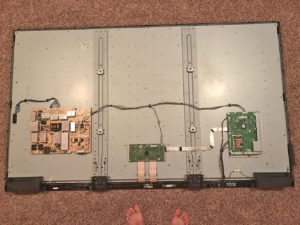
This TV came from a client board room setup where everything ran through HDMI from an A/V receiver and Apple TV. With HDMI dead, the set was basically sidelined. They bought a new display, and I ended up with this one to experiment on.
Sharp no longer had easy new-parts availability for this model line, so second-hand board sourcing was the only realistic option.
Tear Down and Board Identification
I pulled the set down, laid it on carpet, and removed the back cover carefully. Keep screws separated because the bottom row differs from the rest. Main board is on the right side once opened.
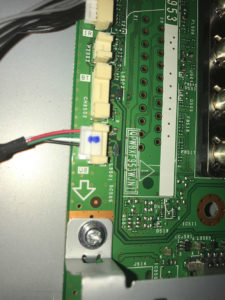
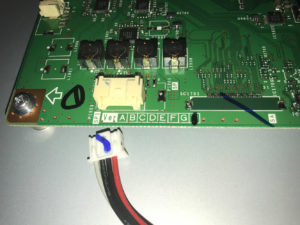
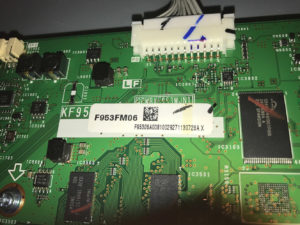
My board details: QPWBXF953WJN1 main board, partial part F953FM06, version H. That version letter matters more than people think.
Service Manual
Start here before opening anything: LC-80LE642U service manual.
Replacement Board Attempts (And Why They Failed)
I bought a used board from eBay around $95. Seller looked legit. Installed it, tested, and recorded the result.
No luck. Then I realized the board sent was Version A, not Version H, even though the listing photo suggested otherwise. That was a bad lesson in trusting stock photos.
I ordered another board, matched version better, learned the service key combos (Input + Volume Down for forced start, Channel Down + Volume Down for service menu), and tested again.
Still same behavior. At that point I put the original board back in and kept using analog inputs until I get a stronger lead.
Where This Repair Stands
Current status: HDMI still dead, analog path still usable, and this one stays on the “open case” list. Sometimes that is the honest ending on older gear.
FAQ
Can I use any LC-80LE642U main board I find online?
No. Match the board identifiers and version letter. A mismatch can boot but still fail functionally.
If analog inputs work, is HDMI board failure still possible?
Yes, that was exactly my symptom set. Working analog does not guarantee the digital path is healthy.
Why would HDMI fail while VGA and component still work?
Because the digital input path can fail separately from the analog side. On this set, analog inputs still worked while all HDMI inputs were dead.
Is this repair worth doing?
If you can source the correct board cheap enough and do your own labor, maybe. If you pay shop rates and parts roulette, it gets expensive fast.
More practical troubleshooting reads?
If you like chasing weird failures, check my Toro PVB leak repair, this Mac OS Classic ethernet battle, and the King Kooker restoration.